The short answer
Reduce the Article to its argument, give each step of that argument one post, and write a new opening that works in the feed. Keep each post under 280 weighted characters, then read the thread as someone who has not seen the Article.
A thread that is only the Article cut into chunks reads like one. Treat it as a second telling of the same idea.
The method
- Write the argument in one sentence. If you cannot, the thread has nothing to hold it together.
- List the steps. Pull out the claims the reader must accept to reach your conclusion. Leave out asides, background and second examples.
- Give each step one post. One idea per post is what lets a reader stop, reply or share at any point.
- Rewrite the opening. The Article's first paragraph was written for someone who had already clicked. The first post has to earn that attention in the feed.
- Replace headings with sentences. A heading labels a section. A post has to say something.
- End on purpose. Finish with the conclusion, a question or a link to the full piece. Choose one.
- Read it cold. Read it from the top, as a stranger would, and cut whatever only makes sense if you know the Article.
We found no official limit on the number of posts in a thread. As a working habit, if yours passes about a dozen posts, ask whether you are still telling the argument or retelling the Article.
A worked example
Here is a section from the sample Article in Pilcrow's demo, split mechanically and then reshaped by hand.
The Article says: "Keep every idea in one backlog the moment it shows up, with a line on why it mattered. On Monday, choose one and write its thesis in a single sentence. If you cannot write the thesis, the idea is not ready yet."
A mechanical split keeps the heading and the shape of the paragraph: "Monday: pick from the backlog, not from the blank page: Keep every idea in one backlog the moment it shows up, with a line on why it mattered."
The reshaped post says one thing: "Before you write, write one sentence: your thesis. If you cannot, the idea is not ready. Put it back and pick another."
The second version is shorter, and it stands alone. Someone who meets it mid-thread, or in a repost, still gets the point.
Counting characters
X counts weighted characters, not letters, and the limit for a standard post is 280:
- Most Latin text counts as 1 each.
- Chinese, Japanese and Korean characters count as 2 each, so about 140 fit.
- Every link counts as 23, whatever its real length.
- Each emoji counts as 2.
Numbering adds a few characters to every post, which is easy to forget. Leave room for "3/8" if you use it. Some paid X plans are reported to allow longer posts, but a thread gains little from them. Short posts are the point of the format.
Linking to the Article
A link in the last post gives interested readers somewhere to go, at a cost of 23 characters. There has long been talk that links reduce reach. In July 2026, X's head of product and Elon Musk were reported as saying that links are not penalized, but X has published no documentation of that, and we would not plan around any claimed percentage. Link if it helps the reader.
A thread is not a caption
A thread is its own piece, with its own timing. It does not add text to your Article's post, and it is not a substitute for a caption. For that, see How to Add a Caption to an X Article.
Common mistakes
- Repeating the Article word for word. Readers who saw both notice. Keep the idea and change the telling.
- Leaning on "as I said above". Posts get read alone, so each one needs its own subject.
- Dropping a list in as it stands. A list that works on a page can look cramped in a post. Keep three items or fewer, or give each one a post.
- Publishing both at once. Unless they are meant to arrive together, leave some days between them so each has its own moment.
- Skipping the last read. Automatic splitting is a first draft. Read every post before it goes out.
Doing it in Pilcrow
The repurposing studio builds the first draft from your own sentences. It splits on sentence boundaries, keeps each post inside the weighted limit and lets you choose between 2 and 25 posts, an opening style, numbering and a closing line. It uses fixed rules, and no AI writes anything for you.
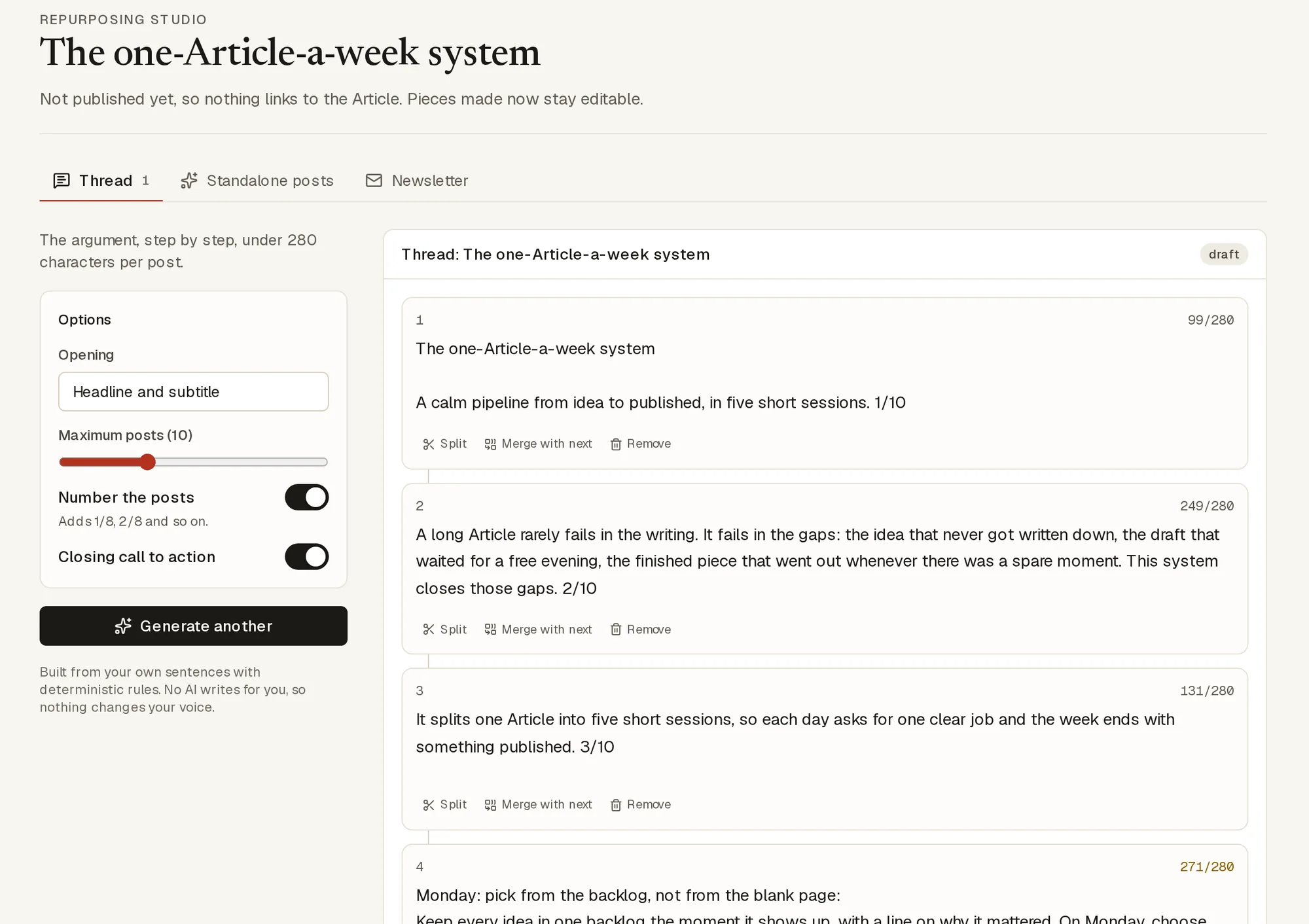
From there, the method above still applies. Edit post by post, split and merge, and rewrite the opening. The mechanical example earlier is what the first draft can look like, and the reshaped one is the work you add. If you change the Article later, the thread shows a note, so you know it may be out of date.
A thread is scheduled the same way as an Article, and on public accounts it is assisted: at your minute you get the posts ready to copy, and you post them on X yourself.
Not sure the idea deserves both formats? See X Articles vs threads.
Sources
- X developer documentation: counting characters
- X Help Center: how to create a thread Our tools could not open this page on 1 November 2026, so we relied on search excerpts.
- PPC Land: X drops year-old link penalty Third-party report of statements made on X in July 2026.