The short answer
Write your Article in X, press Publish, and type into the field labeled "Add a caption to your article" before you confirm. The caption and the Article go out as one post, with your text above the Article card.
It has to be done in X's own composer. X's documented API has no caption field, so no scheduler can add a true caption automatically, and that includes Pilcrow.
How to add one
- Open Articles from X's side navigation and finish your draft.
- Press Publish. The caption is not in the editor. It appears in the step that opens after you press Publish.
- Type or paste your text into Add a caption to your article.
- Confirm. The Article goes out with your caption above it.
X does not document this step, so the description here comes from what writers see in the composer and from a published test by one writer. Labels can change. If yours differs, look for the field in the publish step rather than in the editor.
Why automatic tools cannot add one
X's API offers a publish operation that takes no body. It receives a draft id and creates a post, so there is nowhere to put text. The draft request has no caption field either. The word "caption" does appear in the specification, but it refers to image captions inside the Article, which are a different thing.
So an Article published through the API appears as one post with no text above the card. As of 31 October 2026, we found no product documenting a captioned Article published automatically as one post, and no statement from X about adding it. That could change, so check the date on this page.
X's composer
One post, with a caption
Your caption, in the same post.
Your Article headline
Documented API
One post, no caption
Your Article headline
A separate post
Two posts, not one
Your Article headline
A second post, with its own replies and reach.
Where Pilcrow stands
Pilcrow has not solved this limit, and it does not pretend to. It helps you prepare a caption, and you still enter it in X. Pilcrow refuses automatic publishing for an Article with a caption, because it could not be delivered faithfully.
Why a second post is different
The obvious workaround is to publish the Article, then post about it, quote it or reply to it. Those can be useful in their own right, but they are not a caption:
- Your followers see two posts instead of one.
- Replies, reposts and likes split across them.
- The Article post itself still has no text above it.
If what you want is a sentence above your Article, the only way to get it is X's publish step. Pilcrow never adds a second post on your behalf for this reason.
How long it can be
X does not publish a caption limit that we could find. The one tester above reported a limit of 256 half-width characters, or 128 full-width characters, with the field turning red and Publish disabled past that. That is lower than the standard 280 weighted characters for a post, and we cannot explain the difference.
Pilcrow's counter stops at 280, since that is X's documented post limit, so treat it as an upper bound. Aim for under 250 and X's own counter will not surprise you. The same tester also found that a caption did not show on the iPhone timeline at the time, and suspected a bug, so check how yours looks once it is live.
What to write
The card already shows your cover and headline, so the caption should add something they do not. A few approaches that work well:
- State the claim. Give the argument in one sentence, so the reader knows what they are signing up for.
- Say who it is for. Naming the reader is often more useful than another adjective.
- Explain why now. A change, a date or a decision makes a long read feel timely.
- Leave out "new Article". The card says that already. Use the words for the idea.
Read it aloud, then read it again with the headline. If the two say the same thing, rewrite the caption.
Preparing one in Pilcrow
Writing a caption at the last second is how you end up with a weak one. In Pilcrow you write it while scheduling, with a character count and a preview of the single post. It is saved with the schedule, so what you confirmed is what you will paste.
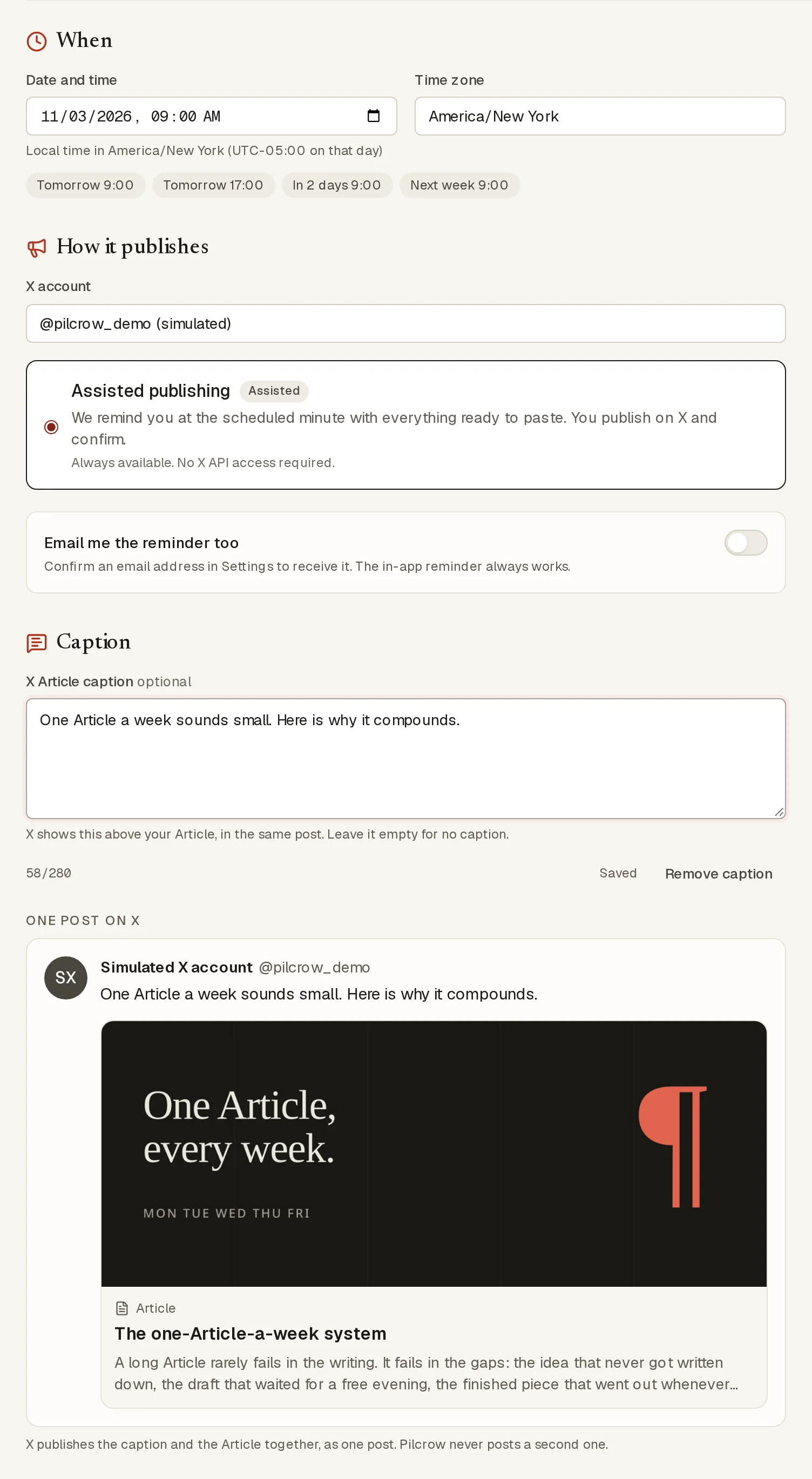
At your minute, the handoff gives you the caption with its own copy button. You paste it into X's publish step, press Publish, and bring the link back. For the rest of that process, see How to Schedule an X Article.
Questions
Can I add a caption after the Article is published?
We know of no documented way. From excerpts of X's Help Center, Edit Article unpublishes the Article for revision, and ordinary post editing is not documented for Article posts. Plan to write the caption before you press Publish.
Is the caption saved with my draft?
We have not confirmed that it is. The documented draft has no caption, which suggests it belongs to the publish step. Keep your text somewhere safe until the post is live.
Does a caption help reach?
X has not said. We would rather not guess. A good caption is worth writing because it tells a reader why to open the Article.
Unsure whether this idea needs an Article at all? Read X Articles vs threads.
Sources
- X API: Articles introduction
- X API: publish Article The request has no body.
- X API specification (OpenAPI) Version 2.173, checked 31 October 2026.
- X developer documentation: counting characters
- X Help Center: Articles Our tools could not open this page on 1 November 2026, so we relied on search excerpts.
- A tester's report on the caption step Third-party, in Japanese, 26 July 2026. One person's test, not an X statement.